
Key custody
Protect the data key that encrypts every secret with a software key, Azure Key Vault or a YubiHSM 2.
Everything Key Guardian stores, including your secrets and its own root key, is encrypted with one data key. The data key is never stored in the clear. Each key slot keeps a copy of it wrapped by a key in a backend:
| Backend | Where the wrapping key lives |
|---|---|
| Software key | ENCRYPTION_KEY, or a key file. The default. |
| Azure Key Vault | An RSA or AES key in your vault. Key Guardian only asks it to wrap and unwrap. |
| YubiHSM 2 | A wrap key inside the HSM, through yubihsm-connector or USB. |
At start-up, Key Guardian tries the enabled slots in priority order until one unwraps the data key, then holds it in memory. An unreachable vault or unplugged HSM doesn’t interrupt attestation; only the next restart notices.
Open Settings → Key custody:
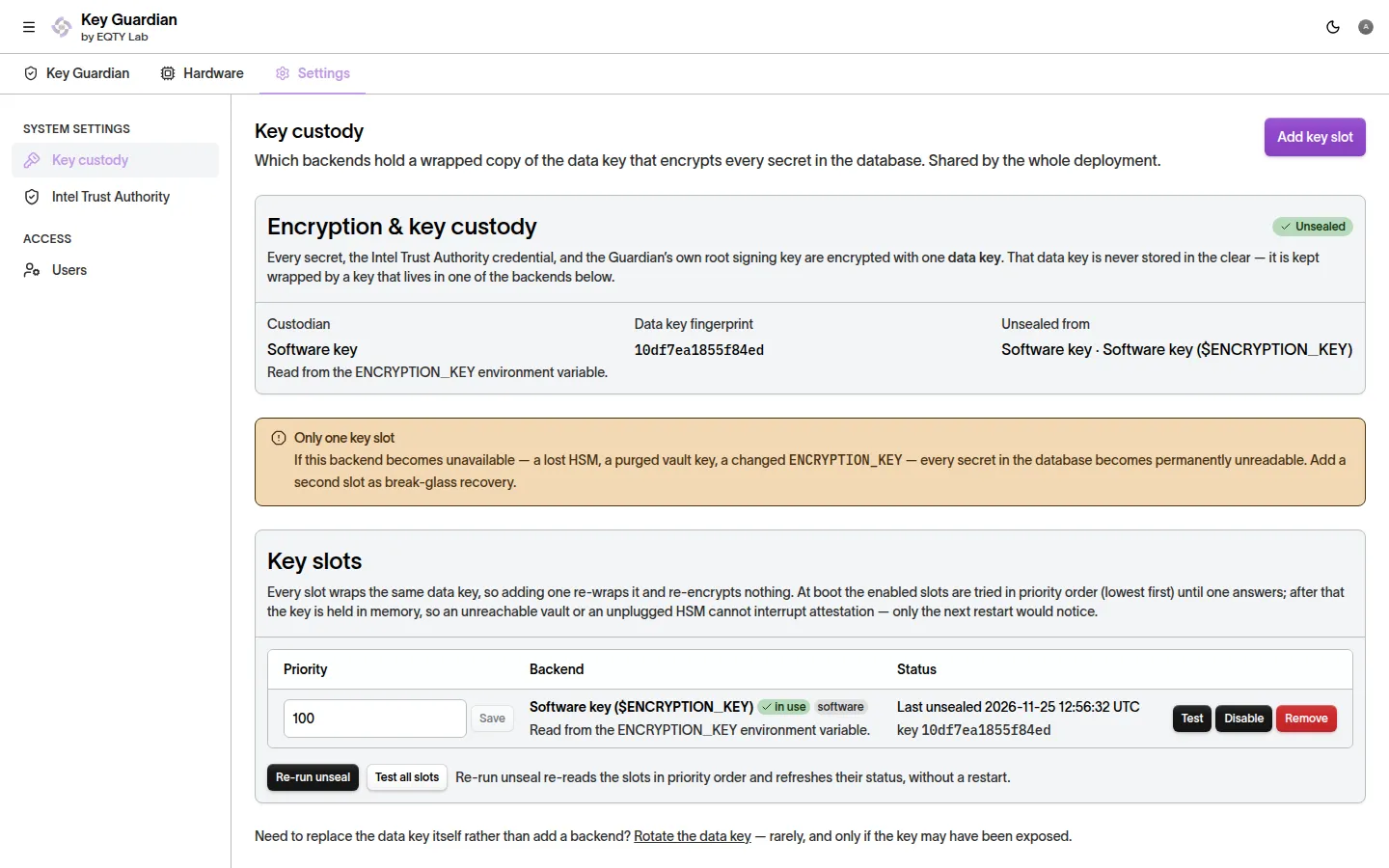
The top card shows which slot unsealed the data key (the custodian) and its fingerprint. Every slot holds the same data key, so every slot shows the same fingerprint.
Add a key slot
Select Add key slot, choose the backend and fill in its settings. Key Guardian tests the backend before saving: it wraps the data key, unwraps it and compares. Nothing is re-encrypted.
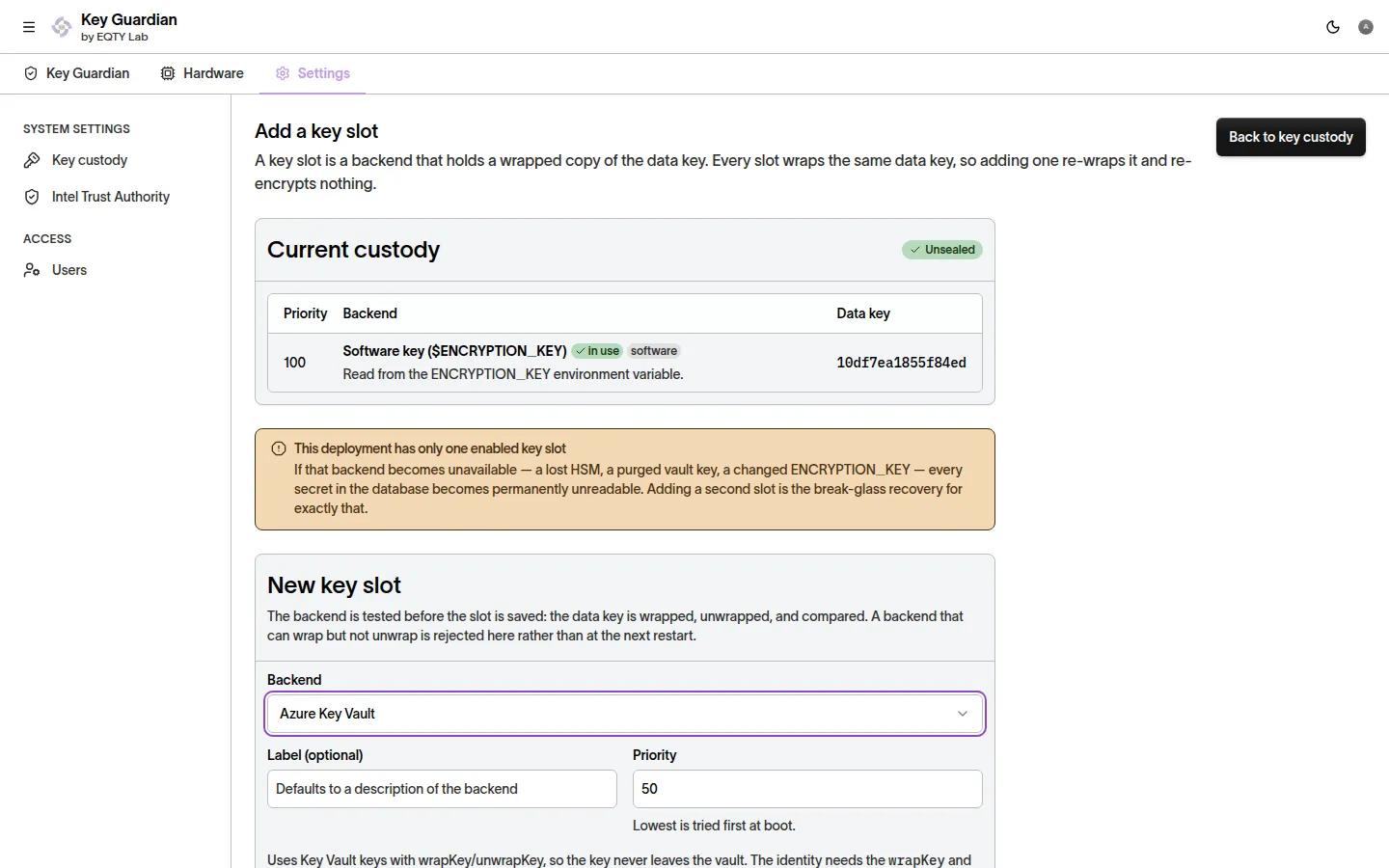
Credentials never go in this form. They come from the server’s environment, because they’re needed before anything can be decrypted. See Configuration.
Azure Key Vault. Enter the vault URL and key name. The identity needs wrapKey and unwrapKey
on the key. Leave the version blank to track the latest. Default authentication tries managed
identity, then the environment, then the Azure CLI. The wrap algorithm is RSA-OAEP-256 unless you
choose RSA-OAEP, or A256KW for an AES key in a Managed HSM.
YubiHSM 2. Enter the connector URL (http://127.0.0.1:12345, or yhusb:// for direct USB),
the authentication key ID and the wrap key ID. The password comes from YUBIHSM_PASSWORD, or a
file. To have Key Guardian create the wrap key, check Create a new AES-256-CCM wrap key on the
device.
Software key. Read from an environment variable (ENCRYPTION_KEY by default) or a key file.
A second software slot makes a good offline recovery key.
Manage slots
- Priority: lowest is tried first.
- Test unwraps the data key with that slot now.
- Disable skips a slot at start-up without removing it.
- Remove deletes it. The only enabled slot can’t be removed or disabled.
Rotate the data key
Rotation replaces the data key itself and re-encrypts every value. Do it only if the data key may have been exposed. To change where it’s kept, add or remove slots instead.
- Back up the database.
- Select Rotate the data key at the bottom of the Key custody page.
- Type
ROTATEand select Rotate.
Every slot must be reachable, or rotation stops without changing anything. It runs in one database transaction.